No. 08 · Roofing
Ridgeline Roofing
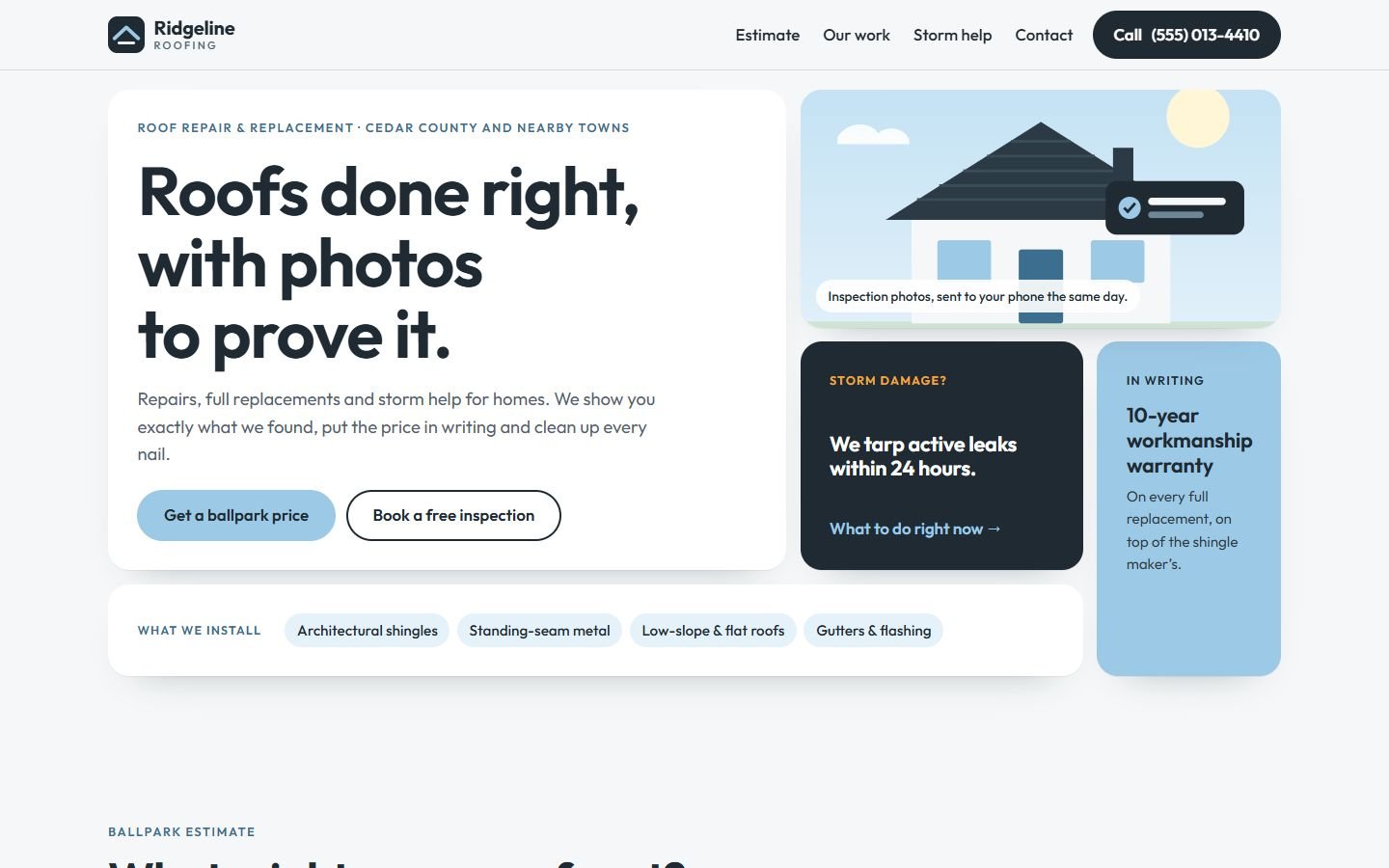
A roofing website built from tiles instead of one big banner, with a ballpark estimator and a before-and-after slider.
- Classification
- Independent concept
- Business
- Ridgeline Roofing (fictional)
- Project type
- Single-page website concept
- Year
- 2026
- Type
- Outfit
The brief
The brief
Design a website for a local roofing contractor that does repairs, full replacements and storm work. Homeowners are wary of roofers, rarely know what a roof should cost, and often arrive after a storm in a hurry. The site has to build trust quickly, answer "roughly how much?" honestly, and give storm visitors a clear next step.
Goals
- 01Give a rough price before anyone picks up the phone
- 02Show the quality of the work, not just claim it
- 03Separate urgent storm visitors from people planning ahead
- 04Turn interest into a booked inspection
On every screen
Designed for phones first


The work
The approach
Most roofing sites open with a photo of a crew on a roof and a phone number. Ridgeline opens with a bento grid: one large tile for the promise, and smaller tiles that each answer one question. Is there storm help? Is there a warranty? What do they install? A visitor can scan it in seconds and pick their own path.
The palette is slate and sky: calm, weather-related and clearly different from the reds and oranges most trades use. Outfit is a clean geometric sans that stays readable at large sizes.
Decisions worth noting
- A price range up front. “What will it cost?” is the question people are afraid to ask. The estimator gives a range from four inputs and explains why the real quote needs an inspection. On a concept site the rates are samples, and the page says so.
- Proof, not adjectives. The before-and-after slider shows the difference instead of claiming “quality workmanship”. It uses a real range input, so it works with the arrow keys and a single tap, not just dragging.
- Storm visitors get their own path. The dark storm tile leads to a short checklist and a phone number, because someone with water coming through the ceiling shouldn’t fill in a form.
How it’s built
One static page. The estimator and slider are a few lines of plain JavaScript; everything else is HTML and CSS. The checklist uses native <details>, the illustrations are inline SVG, and the font is self-hosted.
What would change for a real client
Real photos from past jobs for the slider, the company’s actual pricing for the estimator, license and insurance details, and a link to their scheduling or CRM tool.
What’s on the site
Features actually built
- Bento-grid hero where each tile does one job (intro, inspection photos, storm help, warranty, materials)
- Ballpark estimator using footprint, pitch, material and tear-off layers (sample prices, labeled)
- Before-and-after slider built on a real range input, so it works with a keyboard and a single tap
- Four-step replacement process
- "After a storm" checklist using native details/summary
- Inspection form that carries the ballpark estimate along (demonstration only, nothing is sent)
Palette
- Slate
#1F2A33 - Sky
#9CC9E6 - Mist
#E6F2FA - Storm amber
#F2A93B