No. 02 · Dental practice
Willowmere Dental
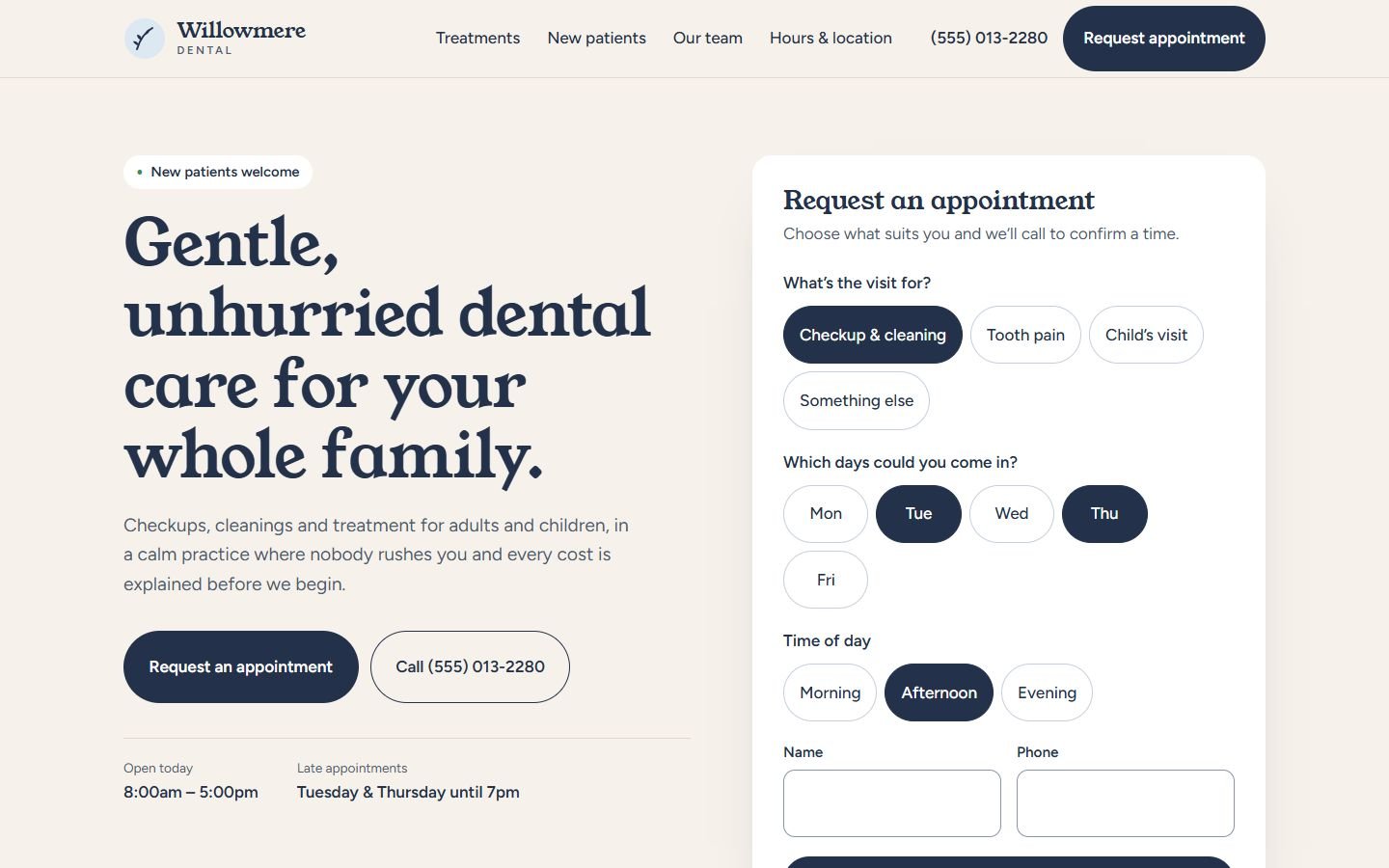
A calm, reassuring website for a family dental practice. Nervous patients can see what happens at a first visit and request an appointment in under a minute.
- Classification
- Independent concept
- Business
- Willowmere Dental (fictional)
- Project type
- Single-page website concept
- Year
- 2026
- Type
- Young Serif, Figtree
The brief
The brief
Design a website for a small family dental practice that wants more new patients, especially people who have put off the dentist for years. The site has to feel calm and human. It needs to answer the questions people are embarrassed to ask, such as "what will it cost?" and "will it hurt?", and make requesting an appointment easier than phoning.
Goals
- 01Reduce anxiety before the first visit
- 02Let new patients request an appointment without a phone call
- 03Answer cost and insurance questions upfront
- 04Introduce the team without relying on stock photos
On every screen
Designed for phones first


The work
The approach
Most dental websites look clinical: white, blue, and a stock photo of perfect teeth. For someone who is already anxious, that’s the wrong first impression. Willowmere is warm: sand instead of white, a soft sky blue, and a friendly serif called Young Serif for headlines. Figtree handles everything practical.
The appointment request sits in the first screen, next to the headline. It asks the three questions a front desk would ask (what is the visit for, which days, what time of day) using large tap targets instead of a long form.
Decisions worth noting
- Say the uncomfortable part out loud. The strip under the hero speaks directly to nervous patients, insurance and surprise bills, the three reasons people put off booking.
- A timeline, not a list of services. “Your first visit” walks through the hour minute by minute, so nothing is a surprise.
- Monograms instead of fake portraits. Until the practice has its own team photos, simple initials keep the section honest and still friendly.
- Hours where people look for them. Today’s hours and the late-opening days sit beside the main button, not only in the footer.
How it’s built
One static page. The appointment chips are real radio buttons and checkboxes, styled visually, so they work with a keyboard and screen readers. Fonts are self-hosted. The only script is the note explaining that the demo form doesn’t send anything.
What would change for a real client
Real team photos and bios, the practice’s actual insurance list, a connection to its booking system (or a form that emails the front desk), and separate pages for treatments that people search for, such as emergency dentistry or children’s dentistry.
What’s on the site
Features actually built
- Appointment request card with visit reason, preferred days and time of day (demonstration only, nothing is sent)
- Today's opening hours and late-appointment days next to the main button
- Reassurance strip for nervous patients, insurance and costs
- Six numbered treatments in plain language
- First-visit timeline, from arrival to treatment plan
- Team section using monograms until real photos are ready
- Opening-hours table and an illustrated location map
- Accessible choice chips (real radio buttons and checkboxes underneath)
Palette
- Harbor ink
#23324A - Sand
#F6F1EA - Sky
#DCE8F2 - Butter
#F1D58A